
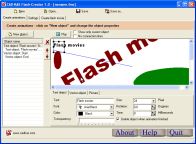
 | Do you need more a more dynamic website? You only set the color, transparency, rotations etc. before and after the animation and the program will render the movie for you! The program offers you unlimited possiblities but is very easy to use! |
 | It incorporates advanced smooth-filtering algorithms for optimized visual appeal and RGB-color channel modification. For business, corporate and commercial use the business version is available at low rates. For personal non-commercial use, XIOview is free. |
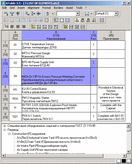 | New features: - AutoCAD 2004 support - formula calculation in cells (like in Excel) - select grid style in OPM (Object Property Manager) - browse block filename to cells - columns and rows autosizing Main features: - dynamic update of table in drawing during editing - dynamic display selected cells in drawing - adding and removing rows and columns - join cell - interface as in Microsoft Excel - changing tables properties in AutoCAD Object Property Manager - switching borders display - switching text object type (DTEXT or MTEXT) - switching text fitting - switching of making lines in cell between strings - automatic text splitting in cell (three modes) - changing insertion point of table - horizontal and vertical aligning of text - easy changing of column width and row height - changing text style of table - easy changing of text height in each cell - easy cahngnig of text line spacing - tuning of width factor and oblique angle (DTEXT only) - simplified table creating from existing one - reading text into cells/rows/columns from drawing - changing layer, color and lineweight for text - changing layer, color and lineweight for vertical and horizontal borders - prepare table in drawing via Lisp function - changing table properties before, during and after inserting table - edit table after insertion - inserting header to table - creating table styles - locking key properties by table style - saving link to Microsoft Excel range - updating grid contens by link to Microsoft Excel range - changing hotkey for main commands - attaching add-ons - English and Russian interface. |
 | With 1-More PhotoCalendar it is easy to create individual photo calendars of high quality. With the registered version, you can select fonts and colors for all parts of the calendar. Many easy-to-use functions will help you to make your calendar an individual artwork. |
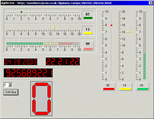 | TdgSpecialDigit is used to display the -. TdgOneDigit is used to display a number from 0-9 in a digital style. For dgMeter1, dgMeter2, dgVmeter1 and dgVMeter2 you can specify the warning and error values, from which the comonents will be in the warning/error state, displaying the indicator in the according color. |
 | Graphics Import Import graphics from shapefiles (maintaining colors and symbols). Annotation Modify Modify annotation features or graphic labels (move or rotate, in- or decrease size, modify color, font or text using an Avenue function). |
 |  |

Network & desktop search |
Search My Network |
LAN Find |
Reminder software |
Software downloads |
WordNet-Online dictionary |
Thesaurus |
CV
Access us via www.LuckyDownloads.com
or www.L-DL.com
Copyright © 2005 Lucky Downloads